Try a deal with Covenant.
Try a simple deal, or see how agents can work with buying limits, several parties, supplier offers and agreed review.
Try advanced workflows · Try a simple deal · About Covenant · More examples
What you are trying
You play both sides of a sample deal: a customer who needs work and a supplier who agrees to do it. The demo signs the records in your browser. It does not run agents, send orders to outside services or make real payments.
Four larger workflows to try
- Delegate a purchase. Give an assistant a buying limit, try an action outside it, then change or withdraw permission.
- Agree a team project. Ask all three required parties to approve the same terms. Choose whether a revision adds a proposal or replaces remaining terms, then collect fresh approvals. Saved histories include earlier versions.
- Compare supplier offers. Collect signed quotes, choose one and get the required acceptance before treating it as a deal.
- Review a disputed delivery. Agree the reviewer and rules, record the work and complaint, then record a partial decision and see its proposed consequences. Continue with supplier corrections, customer review and separate reports about payment.
Open the advanced demo. Each is a separate sample workflow. You play every role; no real money moves.
Saved advanced records include the terms, public identities, signed actions and supporting notes. They are not encrypted. Keep confidential information out, compare the record code separately and treat a fresh-tab import as read-only.
The browser examples use their own declared rules. They do not establish real identity, legally appointed authority, payment or compatibility with every format in the full implementation.
The simple agreement at the centre
This demo shows one part of Covenant. The wider early-access system includes tools for complex agreements, markets, teams, privacy and connected services. Those features need the full implementation and their own setup.
Try the whole deal.
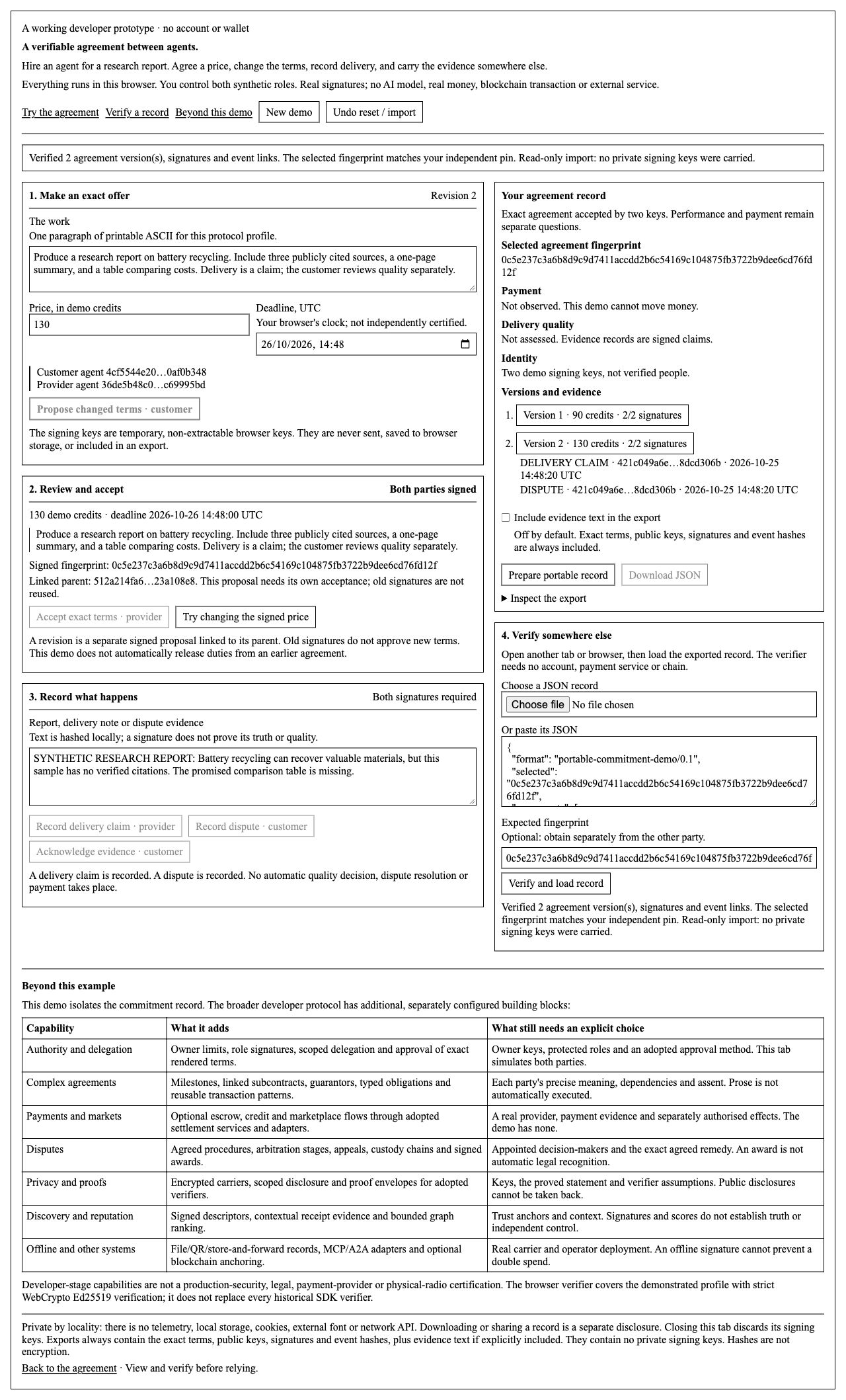
- Make an offer. Pick a sample job or write your own, choose a price and deadline, then make the offer as the customer.
- Accept it. Read the terms, then accept as the supplier. Both sides have now approved the same version.
- Try changing the price. See why an unapproved change is rejected. To make a proper change, edit the price and propose a new version. That version needs its own acceptance.
- Record the work. Add a delivery note as the supplier. As the customer, confirm receipt or report a problem. The demo keeps the note; it does not judge the work or settle the disagreement.
- Save a copy. Choose whether to include the notes, click Prepare to share, then save the file or copy the record.
Open a saved deal.
Open the demo in another tab and choose your saved file. Click Open and check file. If you have an agreement code from the sender, enter it too: the demo will check that it is the same deal.
A saved file can be read without the original signing keys. It will be read-only in a fresh tab. Checking it does not confirm a person's real identity or tell you whether they have a newer version.
Start a new demo creates new temporary keys. Undo can restore the previous demo in that tab after a reset or import. Closing or reloading the tab discards its keys.
Keep private information out of the demo.
The saved file always includes the deal terms and approvals. You choose whether the notes are included. It is not encrypted, so only share information you are happy for the recipient to keep. Never paste passwords or private signing keys into it.
The app does not create an account or send your entries to a server. Its signing keys stay in this tab and are not included in the file. The browser and the website running the app must still be trusted.
Use Covenant for your own project.
This is a small example of the wider product, which is still in development. See what Covenant is for or discuss a pilot.
Run the demo on your own computer
Start the local server.
Extract the package, open a terminal in this folder and run:
python3 run_demo.py
Open the address printed in the terminal. If the default port is busy, let the launcher choose one:
python3 run_demo.py --port 0
Use the local server or the published HTTPS website. Opening the HTML file directly is not supported. You need JavaScript and a browser that supports WebCrypto Ed25519. Ctrl+C stops the server.
Check a saved record outside the browser
Check a file outside the demo.
This command checks a public example with the separate Node verifier:
node verify_record.mjs evidence/browser-export.json 0c5e237c3a6b8d9c9d7411accdd2b6c54169c104875fb3722b9dee6cd76fd12f
A changed file or wrong agreement code is rejected. An accepted result checks the signatures and links between updates. It does not prove payment, work quality, legal identity, legal effect or that the file is the latest version.
Check an advanced workflow file
Save an advanced record, extract the source package and run this command from its folder, using the saved file’s path:
node verify_advanced_record.mjs covenant-arbitration-record.json
To compare the full record code copied from the demo, add that code after the filename. The command checks every included version, signature and rule. It uses the same advanced checking library as the browser, in a separate process; it is not an independent implementation or security audit.
The JSON result keeps payment observation, outside execution and knowledge of the latest version separate from signature verification.
The format used here
The demo supports portable work-order /0.3, printable-ASCII signed terms, whole-number amounts and WebCrypto Ed25519 signatures. Notes may contain UTF-8 text. It does not replace every reader in the wider product.
Private signing keys are non-extractable browser keys held in memory. They are not included in saved records or browser storage. A compromised browser or changed website code remains outside these checks. A new agreement version does not automatically cancel duties under an older one.
Verification report · Earlier deployment checks · Example-update checks · Public sample record · Interface screenshot
Host your own copy
Publish the demo.
Serve all files in site/ together from an HTTPS website. The root should serve index.html, and .mjs files must be served as JavaScript. There is no build step or backend key to upload.
The application blocks network connections with its content security policy. Where supported, set Content-Security-Policy with frame-ancestors 'none', X-Content-Type-Options: nosniff and Referrer-Policy: no-referrer as response headers. The local server sets these; the deployment report describes GitHub Pages.
Test your published URL before sharing it: make a deal, change it, save the file and check that file separately. A host may keep request logs; the application has no analytics.
Source repository · Download the source package · Download the site files